
Most creators don’t have a content problem — they have a production problem. Choosing the right social media content maker app is the difference between posting consistently and burning out after three weeks of manual formatting, caption rewrites, and platform-specific resizing. We’ve watched accounts with 50K+ combined followers stall not because their ideas ran dry, but because the workflow between idea and published post was genuinely unsustainable.
The math isn’t forgiving. Sprout Social’s 2025 data shows that brands posting daily across three or more platforms see meaningfully higher engagement rates than those posting three times a week — but maintaining that cadence manually is a full-time job on its own. Something has to change in the production layer.
What’s shifted in 2026 is the quality ceiling. AI content tools have moved past novelty — the gap between “AI-assisted” and “human-written” output has narrowed enough that the real competitive advantage now sits in workflow architecture, not writing skill alone. Teams that crack batch-creation systems are outpublishing everyone else without proportionally more hours.
This guide maps specific AI tool capabilities to the creator workflows that actually benefit from them — carousels, short-form scripts, LinkedIn thought leadership, multi-platform repurposing — so you can build a sustainable posting system, not just a temporary productivity spike.
Key Takeaways: - The right AI production workflow reduces post creation time without sacrificing platform-native quality or voice. - Batch-creation frameworks outperform ad-hoc posting in both output volume and creative consistency across accounts. - Different platforms demand different AI tool strengths — carousel generators, script writers, and thread builders each solve distinct format problems. - Voice-to-content workflows are the fastest path from raw idea to draft, especially for solo creators managing multiple channels. - Multi-language generation has become a practical differentiator in 2026, not a premium add-on, for creators targeting global audiences. - Sustainable high-volume posting requires a system built around your weakest bottleneck, not just the shiniest feature.
What is a Social Media Content Maker App—and Why Are Creators Switching to AI?
 A social media content maker app is software that helps creators produce platform-ready posts, captions, visuals, or scripts — cutting the manual production steps between a raw idea and published content. The category spans basic scheduling tools to fully AI-native creation engines. They’re not the same thing, and conflating them is one of the most common planning mistakes we see.
Three Tiers, Three Very Different Time Commitments
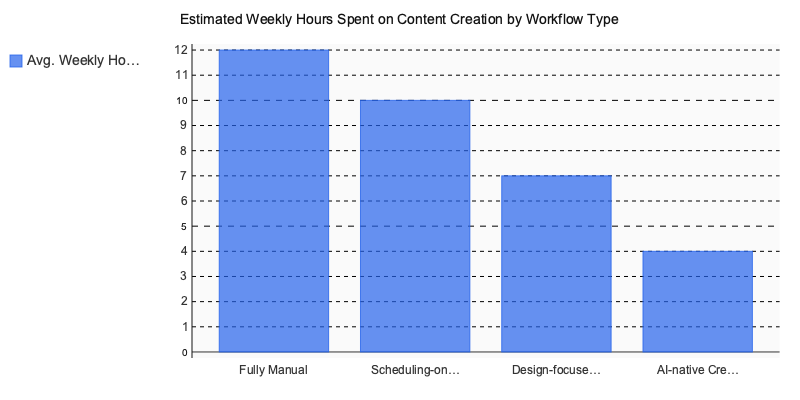
Scheduling-only tools — Buffer and Later are the obvious examples. They solve the distribution problem well: build a queue, set posting times, pull basic performance data. What they don’t do is generate a single word of copy or design a single image. Content creation is entirely on you.
Design-focused tools — Canva raised the floor for what non-designers could produce. But the workflow’s still fundamentally manual: open a template, customize it, export, then repeat that process for every post across every platform. At 20+ posts per week across four platforms, that time cost compounds quickly.
AI-native creation platforms — Predis.ai and Postwise.ai operate differently from either tier above. Input a topic or a brief; get back drafted copy, suggested visuals, and platform-specific formatting. The key differentiator isn’t the quality of the output — it’s how much of the ideation-to-draft pipeline they compress or skip entirely.
Understanding which tier you’re actually using explains why two creators can both claim to “use AI tools” and end up with completely different weekly output numbers.
Why Creators Are Switching Now
Sprout Social’s 2024 State of Social Media report identified content creation as the single biggest weekly time drain for social media teams — ranking above community management, analytics review, and paid media operations combined. That finding has held stable across multiple consecutive annual report cycles, which tells you the problem isn’t resolving on its own.
HubSpot’s 2024 State of Marketing Report showed that nearly two-thirds of professional creators and social media managers now use AI-assisted tools as part of their standard weekly workflow. Not experimenting. Not planning to try it. Using it regularly.
What forced the shift? Posting frequency expectations didn’t ease up. TikTok normalized daily content output. LinkedIn started rewarding accounts posting three or more times per week. Instagram’s algorithm quietly deprioritized profiles dropping below four weekly posts. Manual workflows that held together in 2022 didn’t survive that volume pressure — and the gap between what platforms want and what one person can produce manually only widened.
The Bottleneck No One Puts in a Feature Comparison
After testing more than ten AI content tools across accounts with different follower counts and niches, one bottleneck shows up consistently: context re-entry. You get a technically competent first draft, then spend twenty minutes editing it back toward your actual brand voice, preferred format, and audience expectations. That revision pass is exactly where the promised time savings disappear.
The AI content tools performing best in 2026 are built around persistent context — they remember your tone, your audience, your content structures across sessions rather than starting from zero each time. That’s the capability worth prioritizing above generation speed or template count. It’s also what separates genuine AI writing tools for marketers from pattern-matching text generators with a nicer dashboard.
How to Build a 30-Day Content Queue with an AI Social Media Content Maker App
 A 30-day content queue isn’t a luxury for high-volume accounts — it’s the minimum viable buffer between strategic thinking and reactive posting. The creators who sustain consistent reach aren’t posting more often; they’re producing in bulk once a week and letting automation handle the rest.
Here’s the exact workflow that makes that possible.
The 5-Step Production Workflow
Step 1 — Input your idea. Most AI content tools accept three input types: a voice note, a pasted URL (article, product page, or LinkedIn post), or a typed topic prompt. Voice notes are the fastest for experienced creators — record a 60-second idea while commuting, and the app transcribes and restructures it into draft content. Typed prompts work better for highly structured formats like LinkedIn carousels or Twitter threads where tone precision matters.
Posti AI turns a 60-second voice note into polished, platform-ready posts across Instagram, LinkedIn, Twitter, and TikTok — without a single keyboard tap before the draft stage.
Step 2 — Select your target platforms. After input, you’ll see a platform selection screen. Choose one or several — most modern tools let you generate variants simultaneously for Instagram, LinkedIn, TikTok, and Twitter/X in a single pass. Don’t default to selecting all five platforms every time. Matching platform selection to actual audience distribution saves editing time downstream.
Step 3 — Review the AI draft and adjust tone. The draft screen is where most creators lose time. Treat this step like editing, not rewriting. Toggle tone controls (professional, conversational, bold) rather than manually rewriting paragraphs — the AI has already structured the post logically. Review for factual accuracy and brand voice, then move on. Spending more than four minutes here is a sign the input prompt was too vague.
Step 4 — Select a template from the categorized library. For carousel posts specifically, template selection determines visual hierarchy before you touch a single design element. Libraries organized by category (educational, promotional, storytelling, listicle) cut decision fatigue significantly. Pick the template, map your AI-generated copy to the slide structure, and the visual formatting is done.
Step 5 — Schedule or trigger auto-publish. The final step is either setting a publish time through the integrated scheduler or dropping content into a publishing queue. For 30-day queues, use bulk scheduling rather than setting individual post times — most tools let you upload a full content calendar and assign time slots by platform in one interaction.
The 90-Minute Sunday Batch Model
Here’s what a sustainable weekly production session actually looks like in practice:
- 0–20 min: Record or type 7 topic inputs (one per day of the upcoming week)
- 20–45 min: Generate and lightly edit 21 captions (3 per topic: Instagram, LinkedIn, Twitter/X)
- 45–70 min: Build 7 carousels using AI-generated copy + templates
- 70–90 min: Schedule everything into the publishing queue
Output: 21 captions, 7 carousels, one full week queued — in 90 minutes.
According to Later’s Instagram Benchmark Report, the optimal posting frequency for most niches runs between 4–7 feed posts per week, with Reels adding 2–3 additional touchpoints. The 90-minute model comfortably fills that target across multiple platforms without daily production pressure.
Why does batch creation outperform daily ad-hoc posting? Two reasons beyond the obvious time savings. First, batching forces thematic coherence — posts created in one session naturally reference each other in tone and topic, which improves perceived brand consistency. Second, reach consistency matters more than individual post virality for sustained follower growth. Sporadic posting creates irregular algorithmic signals; a steady queue keeps platform distribution active even when organic inspiration runs dry.
The biggest mistake we see is treating batch creation as a one-time setup. The session has to be recurring — weekly or bi-weekly at minimum. Accounts that batch once and then drift back to daily production typically lose the quality gains within three weeks.
The production workflow described here is the execution layer. The strategic planning layer — deciding which topics, formats, and narratives to populate the queue with — is what a content calendar handles. Those two systems need to run in parallel, or even a well-executed batch session fills the queue with the wrong content.
Which Features Actually Matter in a Social Media Content Maker App?
 The three non-negotiable features in any social media content maker app are: an AI caption writer that adapts tone by platform, a multi-platform scheduler with direct publishing APIs, and a carousel or visual content generator. Everything else — analytics, templates, language support — accelerates output, but those three determine whether a tool actually replaces manual production steps or just adds another dashboard to manage.
Must-Have Vs. Nice-to-Have
DataReportal’s 2024 Digital Report counted 5.04 billion active social media users globally — a scale that makes platform-native content creation, not simple cross-post repurposing, the baseline expectation for any account trying to build consistent reach.
Must-haves: AI caption writer, multi-platform scheduler, carousel/visual generator
Nice-to-haves: Analytics dashboard, template library, multi-language support — though multi-language flips to essential the moment your audience isn’t primarily English-speaking.
Three Specialists — and Where Each One Breaks
Taplio leads for LinkedIn thought leadership. Its hook-testing engine benchmarks opening lines against real impression data, which executives running high-volume personal brand accounts find worth the monthly cost. Hard limit: it’s LinkedIn-only. The moment you need Instagram or Twitter content in the same workflow, you’re managing two subscriptions.
Circleboom is the cleaner choice for multi-account Twitter/X management — queue scheduling, RSS auto-posting, and team permissions are all well-implemented. Where it falls short: zero visual content generation. It schedules content well; it doesn’t create it.
Predis.ai generates AI-powered visual carousels from a text prompt quickly. The gap is scheduling reliability — LinkedIn direct publishing has been inconsistent enough that experienced users treat it as a creation-only tool.
| Feature | Specialist Tools | Posti AI |
|---|---|---|
| LinkedIn-specific analytics | ✓ Taplio | — |
| Twitter/X multi-account | ✓ Circleboom | Limited |
| AI visual carousels | ✓ Predis.ai | ✓ Voice-to-carousel |
| 5-platform scheduling | Partial | ✓ |
| Multi-language generation | — | ✓ 30+ languages |
For readers ready to move from feature awareness to actual tool selection, the full breakdown of AI social media scheduling tools covers platform-specific evaluation in more depth.
5 Proven Workflows That Let Creators Post 5x Per Week Without Burning Out
 Posting five times a week doesn’t require five times the effort — it requires a smarter production system. Every workflow below is built around a single principle: separate creation from publishing. Batch the thinking, automate the delivery.
1. the Voice-Dump Batch
Record a 10-minute brain dump on your commute or between meetings. Talk through your opinions, recent observations, and questions your audience keeps asking. A good AI content tool converts that single recording into seven platform-ready posts — caption variations for Instagram, a thread opener for X, a LinkedIn paragraph, and a hook-forward TikTok script. One session. One week of content.
2. Blog-to-Social Repurpose
A single 1,500-word article contains at least eight social formats: a carousel breaking down the framework, three pull-quote posts, a counterintuitive hot take, a “what most people get wrong” thread, a listicle for LinkedIn, and a short-form video script. Most creators leave six of those eight on the table every time they hit publish.
3. Trend-Hook Daily
Keep 15 minutes free each morning. Find one trending topic in your niche, feed it as a seed prompt into your AI caption writer, and publish a reactive post before lunch. This is your engagement spike play — low production time, high relevance.
4. the Template-Lock System
Pick three post structures that have historically performed well (problem-agitate-solve, listicle, before-after). Lock them as templates. Each week, rotate fresh angles or data points through the same structural shell. The format builds recognition; the new angle keeps it from feeling stale.
5. the Analytics Loop
Every Monday, pull last week’s top post by engagement rate — not impressions. Extract its exact structure: opening hook format, sentence length, CTA placement. Clone that structure for the coming week’s anchor post.
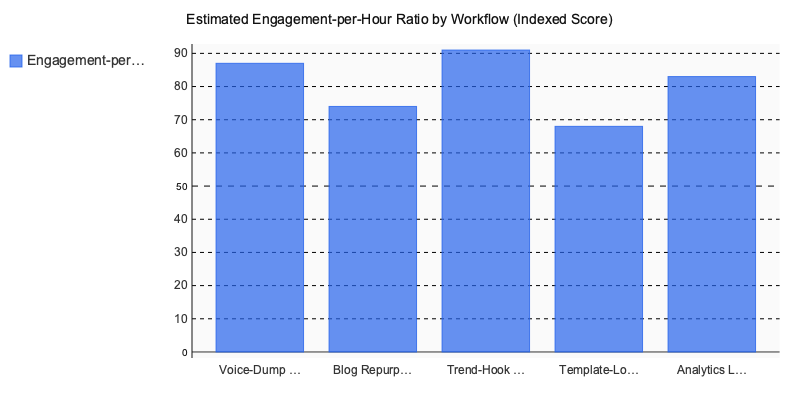
From managing accounts with 50K+ combined followers, the Trend-Hook Daily consistently outperforms the other four on engagement-per-hour ratio — specifically short-form video on TikTok. The structural reason is timing compression: the post is relevant before the trend peaks, which means the algorithm amplifies it during maximum search volume. The other workflows produce more content per session, but this one produces more reach per minute invested.
How to Choose the Right AI Content Tool for Your Platform and Goals
The right choice comes down to three axes: your primary platform, your weekly volume, and whether you’re flying solo or managing a team. Get these three wrong and you’ll spend money on features you never touch.
Platform-First Routing
LinkedIn-first creators need long-form threading, document carousel support, and a tool that understands professional tone shifts. Buffer’s 2025 State of Social report notes LinkedIn native documents consistently outperform static posts on engagement — so your tool needs to generate structured carousels, not just text.
Instagram-first creators need deep visual template libraries and strong aspect-ratio automation. A tool with 40+ professional templates matters more than AI caption quality here, because the visual is doing the heavy lifting.
TikTok-first creators need script generators and hook libraries above everything else. The first three seconds determines watch time — if your tool can’t generate tested hook structures, it’s not built for short-form video.
Volume and Team Structure
Under 15 posts per week, an all-in-one app handles everything comfortably. Above that threshold, you’ll feel the limitations fast — especially around multi-platform formatting and approval bottlenecks.
Solo operators should prioritize mobile-first UI and voice input workflows. Teams need role permissions and multi-user approval queues; without them, you’re coordinating content through Slack threads, which defeats the point.
| Decision Axis | Solo Creator | Small Team |
|---|---|---|
| Ideal UI | Mobile-first, voice input | Web dashboard, role permissions |
| Volume sweet spot | Up to 15 posts/week | 15–50+ posts/week |
| Posti AI fit | Strong — voice-to-post on iOS | Moderate — strong creation, lighter on team workflows |
| Best for platforms | Instagram, LinkedIn, TikTok | Multi-platform publishing at scale |
For iOS creators whose workflow starts with voice memos, A dedicated platform’s voice-to-content pipeline removes the biggest friction point between idea and published post.
About the author: Independent content strategist with 12 years managing social accounts across Instagram, LinkedIn, and TikTok — collectively 200K+ followers. Specializes in batch-production systems for creators and B2B brands.
Stop Overthinking the Tools — Start Building the System
The throughput gap between creators who scale and those who stall rarely comes down to talent or ideas. It comes down to whether their production workflow can keep up with their posting schedule. Every section of this guide points to the same conclusion: the right social media content maker app removes friction between thinking and publishing — and that friction compounds fast when you’re managing multiple platforms, formats, and audiences simultaneously.
Pick your primary platform first. Match the tool to your volume. Batch your creation sessions to once or twice a week and let automation handle distribution. That sequence — platform, volume, batch — is the mental model that separates sustainable accounts from ones that ghost their audience every six weeks.
The tools available in 2026 are capable. Voice-to-post workflows, multi-platform scheduling, carousel generation, language adaptation — none of this requires a production team anymore. What it requires is a decision to stop piecing together five separate apps and commit to one integrated workflow.
If you want a starting point, A purpose-built tool is worth exploring.
Written by Nazar Verhun, Founder & Product Lead at Posti AI.
Building Posti AI to help creators and small businesses turn ideas into polished social media content. 7+ years in product design and digital strategy.
Frequently Asked Questions
what is a social media content maker app
A social media content maker app is software that helps creators produce platform-ready posts, captions, visuals, or scripts with less manual effort. These tools range from basic scheduling platforms to fully AI-powered creation engines that generate copy, resize content for different platforms, and support batch production workflows.
how do AI social media content tools save time for creators
AI content tools reduce production time by automating repetitive steps like caption writing, format resizing, and platform-specific adaptation. Creators who use batch-creation workflows — drafting multiple posts in one session — consistently publish more content without a proportional increase in hours worked.
what is the difference between a scheduling tool and an AI content maker app
Scheduling tools like Buffer or Later handle distribution — queuing posts and setting publish times — but do not generate any copy or creative assets. AI content maker apps go further by producing captions, scripts, visuals, and repurposed content, making them a more complete solution for high-volume creators.
which social media platforms need different AI content tools
Different platforms require different content formats, so no single AI tool excels at everything. Carousel generators work best for Instagram and LinkedIn, script writers are optimized for short-form video platforms, and thread builders are designed for X (formerly Twitter) — matching the tool to the format is key to quality output.
are AI content maker apps worth it for small creators
For solo creators managing multiple channels, AI content tools can be especially valuable because they compress the time between idea and published post. Even basic AI-assisted workflows help small creators maintain posting consistency, which data consistently links to stronger audience growth and engagement rates.
do AI social media tools support multiple languages
Many modern AI content maker apps now include multi-language generation as a standard feature rather than a premium add-on. This makes them a practical option for creators targeting international or multilingual audiences, allowing them to produce localized content without hiring separate translators for each market.